Benchmark v1.0 · report
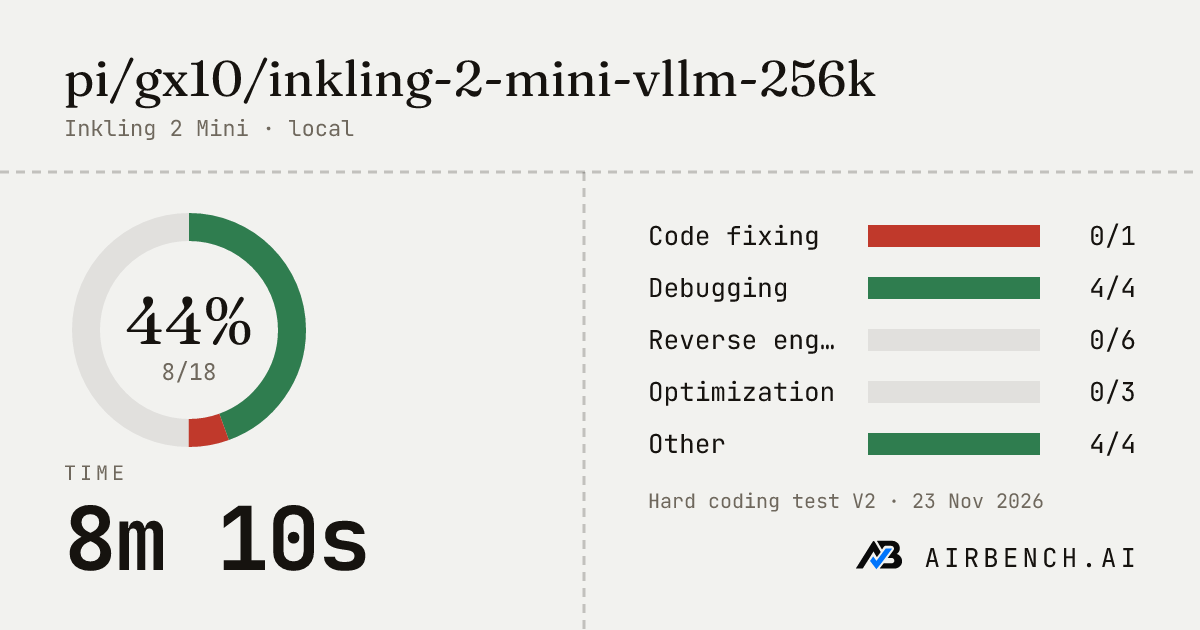
pi/gx10/inkling-2-mini-vllm-256k
setup
declared capsule
Agents · Inkling 2 Mini · vLLM · GB10 · 104 GB VRAM
m64_bab67b2ff910 · every run of it
The model, engine and model link come from the capsule. You say the run used it; airbench doesn't check.
Want to reproduce this?
m64 m64_bab67b2ff9105 other runs of this capsule →
- model type
- open model (local)
- GPU
- NVIDIA GB10
- harness
- pi
- model
- Inkling 2 Mini
- VRAM
- 104 GB
- RAM
- not given
- inference engine
- vLLM
partial run · 9 unanswered, counted against the score
tests
Hard coding test v2
8/18 passed · 9 unanswered
fix-one-1✕ fail1m 00s
prompt
Download airbench.ai/f/3c3c11a9184cbdc88fe7d4d7b694c5fb.zip and unzip it. It contains one Python file with a unit test file (Python 3.10 or newer, standard library only). One test fails because of a bug. Fix the bug, then run the Python file that is not the test file (`python <name>.py`) inside the folder and respond with just the 8-character code it prints after `checksum`.answer
answer hidden on shared reportsagent's debrief
Simple bug: bad-quantity count was never incremented and float quantities like 1.5 were silently dropped. Fixed sum_lines to parse floats, count bad lines, and submit the checksum.
trace-1✓ pass1m 06s
prompt
What exactly does this JavaScript program print? Run it in your head or in any JavaScript engine (non-strict mode). Respond with just the printed output. function* v1gen() { for (let i = 1; i <= 7; i++) yield i * 3; } const v1it = v1gen(); const v1head = []; for (let i = 0; i < 2; i++) v1head.push(v1it.next().value); const v1ret = v1it.return(94); const v1 = v1head.join("+") + "|" + v1ret.value + "|" + v1ret.done + "|" + [...v1it].length; let v2 = ""; switch (9) { case 5: v2 += "a"; case 1: v2 += "b"; case 2: v2 += "c"; break; default: v2 += "d"; case 3: v2 += "e"; } function v3f(a, b) { arguments[0] = 13; b = 14; return [a, arguments[1], arguments.length].join("/"); } const v3 = v3f(3, 4) + ";" + v3f(3); function v4f(x = y, y = 19) { return x + y; } const v4safe = (fn) => { try { return fn(); } catch (e) { return "TDZ"; } }; const v4 = [v4f(3), v4safe(() => v4f()), v4f(3, 4), v4safe(() => v4f(undefined, 3))].join(","); let v5 = ""; outer: for (let i = 0; i < 3; i++) { for (let j = 0; j < 4; j++) { if (j === 1) continue outer; v5 += i * 10 + j + " "; } v5 += "|"; } console.log(v1, v2, v3, v4, v5);answer
answer hidden on shared reportsagent's debrief
Ran it in node rather than tracing by hand; verified switch fall-through, arguments aliasing, TDZ defaults and labelled continue. Printed line ends with a trailing space.
spec-impl-1✓ pass1m 06s
prompt
Specification: interval scheduling. Write a function that, given a list of intervals `s-e` (integers with s < e), selects as many intervals as possible such that no two selected intervals overlap, using this greedy algorithm: 1. Sort all the intervals by end e, smallest first. 2. Intervals with the same end are ordered shorter first (smaller e - s first). Intervals that are still tied (identical intervals) keep their input order. 3. Go through the sorted list once. Select an interval if it does not overlap the interval selected most recently (the first interval is always selected); otherwise skip it. Skipped intervals are never reconsidered. Two intervals overlap if they share any point, including a single endpoint: `1-3` and `3-5` do overlap, because both contain 3. The next selected interval must start strictly after the previous one ends. Each input line holds the intervals separated by single spaces, for example `1-3 4-9`. The word `none` stands for an empty list. For each input, output the number of selected intervals, a colon, then the selected intervals in the order they were selected, separated by commas and with no spaces, for example `2:1-3,4-9`. With no selected intervals output `0:`. The 15 inputs, one per line: none 2-6 2-6 2-6 1-3 3-5 5-8 8-10 1-10 2-3 4-9 6-9 2-4 12-15 20-26 15-16 6-10 12-17 18-19 15-20 5-9 12-13 13-17 11-13 10-11 19-21 7-12 20-26 12-18 0-1 6-9 9-10 0-3 12-17 1-4 15-17 14-16 14-16 15-20 19-25 11-12 17-20 11-13 16-18 17-23 18-24 19-23 14-17 2-7 8-9 16-19 8-13 16-18 19-20 2-4 17-22 2-7 5-7 11-12 12-18 16-22 8-11 14-20 16-17 15-18 13-18 10-14 13-17 12-18 13-18 5-7 12-18 2-8 Implement it in any language you like and respond with exactly 15 lines: the result for each input, in order. One result per line, nothing else (no numbering, no commentary).answer
answer hidden on shared reportsgrader
15/15 lines match
agent's debrief
Wrote a small greedy implementation (sort by end, then shorter, then input order; select if start strictly greater than last end) and hand-checked the tricky cases.
issue-crash-1✓ pass51s
prompt
Download airbench.ai/f/f557716ce73c342c26ea9f25889d1286.zip and unzip it. It is a small Python project (Python 3.10 or newer, standard library only). A user filed this issue: > **`python main.py data/real.csv` crashes** > Some timestamps have no Z and no offset, and the README says a timestamp without either is UTC. > ``` > Traceback (most recent call last): > File "/home/user/orders/main.py", line 22, in <module> > main() > File "/home/user/orders/main.py", line 12, in main > rows = keep_latest(open_export(path)) > File "/home/user/orders/shop/ingest.py", line 28, in open_export > return collect_rows(f) > File "/home/user/orders/shop/ingest.py", line 37, in collect_rows > rows.append(to_record(row)) > File "/home/user/orders/shop/ingest.py", line 49, in to_record > instant = parse_ts(row["ts"]) > File "/home/user/orders/shop/timestamps.py", line 9, in parse_ts > local = datetime.strptime(text, AWARE) > ... (standard library frames omitted) > ValueError: time data '2025-11-25T00:19:41' does not match format '%Y-%m-%dT%H:%M:%S%z' > ``` Fix the bug so the program follows its README, then run `python main.py data/real.csv` inside the project folder and respond with just the 8-character code it prints after `checksum`.answer
answer hidden on shared reportsagent's debrief
Simple fix: parse_ts only accepted timestamps with Z/offset; now it falls back to naive-as-UTC. Sample checksum matches README (ed90ded3).
issue-feature-1✓ pass1m 14s
prompt
Download airbench.ai/f/1411c67cf0957a40675a9da083d55b85.zip and unzip it. It is a small Python project (Python 3.10 or newer, standard library only). A user filed this feature request: > **Round USD tax half to even** > > Our accountant says USD tax must use banker's rounding: when an order's USD tax comes out at exactly half a cent, round it to the nearest even cent instead of rounding up. Anything that is not exactly half still rounds to the nearest cent. Orders in every other currency keep rounding half up as the README says (rule 7). > > For example, with this `example.csv`: > > ```csv > order_id,ts,customer,region,sku,qty,unit_price,currency,category > H2210,2026-03-14T10:00:00Z,c204,US,GN-310,1,0.50,USD,general > H2211,2026-03-14T10:00:00Z,c204,APAC,GN-310,1,25,JPY,general > ``` > > `python main.py example.csv` should print these report lines (before the checksum): > > ``` > period: 2026-03..2026-03 > APAC 2026-03 JPY orders=1 gross=28 rate=10% last=H2211 > US 2026-03 USD orders=1 gross=0.54 rate=9% last=H2210 > ``` > > Today it prints: > > ``` > period: 2026-03..2026-03 > APAC 2026-03 JPY orders=1 gross=28 rate=10% last=H2211 > US 2026-03 USD orders=1 gross=0.55 rate=9% last=H2210 > ``` The checksum the README gives for `data/sample.csv` describes the program as it is today; once the request is implemented, the program's output (and that checksum, when run with the request's options) is expected to change. Implement the request, keeping everything else as the README says. Then run `python main.py data/real.csv` inside the project folder and respond with just the 8-character code it prints after `checksum`.answer
answer hidden on shared reportsagent's debrief
Implemented half-even rounding for USD taxes only (exact integer math on n=taxable*rate, 100-cent units); everything else unchanged. Verified the worked example prints exactly the expected lines and tests still pass.
spec-violation-1✓ pass36s
prompt
Download airbench.ai/f/1a65702813f6dcb58bb2e511544deb21.zip and unzip it. It is a small Python project (Python 3.10 or newer, standard library only). The unit tests pass, but `python main.py data/sample.csv` does not print the checksum the README promises. Make the program follow its README, then run `python main.py data/real.csv` inside the project folder and respond with just the 8-character code it prints after `checksum`.answer
answer hidden on shared reportsagent's debrief
Only spec violation was DEFAULT_RATE=0 instead of 20 for unknown regions. Checked every module against the README line by line; sample checksum now matches (13166128).
far-cause-1✓ pass19s
prompt
Download airbench.ai/f/d8e108553eedac714632a0e42ae70050.zip and unzip it. It is a small Python project (Python 3.10 or newer, standard library only). A user filed this issue: > **Report doesn't match the ledger** > Finance reconciled the report for `data/real.csv` against the ledger. For `APAC 2026-08 JPY` the ledger has a gross of `5110312`, but the report prints `gross=5101857`. > `python main.py data/sample.csv` still prints the checksum in the README. Find the cause and fix it so the program follows its README, then run `python main.py data/real.csv` inside the project folder and respond with just the 8-character code it prints after `checksum`.answer
answer hidden on shared reportsagent's debrief
Root cause: revision dedup compared raw ts strings (row.ts >= kept.ts) instead of instants, so offset-carrying timestamps sorted wrong. Fixed to compare instants; APAC 2026-08 JPY now matches the ledger (5110312) and sample checksum is unchanged.
interacting-1✓ pass30s
prompt
Download airbench.ai/f/735cb7d50174860a9a51deb7028bc13f.zip and unzip it. It is a small Python project (Python 3.10 or newer, standard library only). A user filed this issue: > **Report totals don't match the ledger** > Finance reconciled the report for `data/real.csv` against the ledger. These groups are off: > > | group | ledger gross | report prints | > |---|---|---| > | `LATAM 2025-07 JPY` | `2644421` | `26626.48` | > | `LATAM 2025-08 USD` | `32496.86` | `32571.21` | > | `US 2025-07 USD` | `362300.52` | `367264.86` | > > All unit tests pass and `python main.py data/sample.csv` prints the checksum in the README, so nothing else flags it. There may be more than one cause. Fix the program so it follows its README, then run `python main.py data/real.csv` inside the project folder and respond with just the 8-character code it prints after `checksum`.answer
answer hidden on shared reportsagent's debrief
Three interacting bugs: JPY treated as 2 decimals with a divide-by-100 hack in to_minor; bulk thresholds used > instead of >=; tax used round() instead of half-up. Sample matches README and the three ledger groups now agree.
perf-1✓ pass1m 30s
prompt
Download airbench.ai/f/39115151576013c0a706dfcd7338d5b2.zip and unzip it. It is a small Python log analyzer (Python 3.10 or newer, standard library only). It is correct but far too slow: `python gen.py 626829457 1000000 > data/big.log` then `python main.py data/big.log` (run inside the project folder) would take hours. Make it fast without changing its output (the README gives the sample checksum), then respond with just the 8-character code it prints after `checksum` for `data/big.log`. The download link stays valid for the whole run.answer
answer hidden on shared reportsagent's debrief
Fixed four hotspots: O(U*E) user join -> dict lookup; O(n^2) distinct-pairs -> set; leader tracking scanning all totals per event -> lazy-deletion heap; percentile O(n^2) -> sorted. Sample checksum unchanged (2538ca92); the 1M-event log now runs in ~6s.
rev-cpu-target1— unanswered—
prompt
This is target 1 of 6. The six targets run on the same CPU and come from the same download, but each one is its own challenge, passed or failed on its own, so submit a target as soon as you have it. Download airbench.ai/f/b117fa7eaa726a2c4e757f4eea6c1425.zip and unzip it. It holds one folder, cpu/. The download link stays valid for the whole run. This CPU is undocumented. Using the partial spec (cpu/partial_spec.md), the probe programs and their execution traces (cpu/probes/), work out how it behaves, then run each target program in cpu/targets/ (target1.hex ... target6.hex, no traces given) until it halts. Program files come as hex text; partial_spec.md says how to decode them. For each target, report: - the FNV-1a 32-bit hash of all bytes the program wrote to port 0, in order, as 8 lowercase hex digits (offset basis 0x811c9dc5, prime 0x01000193); - the final value of register R0, as 4 lowercase hex digits. Work autonomously: nobody will answer questions or confirm anything during this task, so never stop to ask. If you are stuck on part of the CPU, make your best inference and keep going. Each target leans on a different part of the CPU, so one you cannot work out costs only the targets that use it. Always answer: a target you are unsure of still passes if it is right. Answer with one line for this target, in this format: target1 <hash> <r0>rev-cpu-target2— unanswered—
prompt
This is target 2 of 6. The six targets run on the same CPU and come from the same download, but each one is its own challenge, passed or failed on its own, so submit a target as soon as you have it. Download airbench.ai/f/b117fa7eaa726a2c4e757f4eea6c1425.zip and unzip it. It holds one folder, cpu/. The download link stays valid for the whole run. This CPU is undocumented. Using the partial spec (cpu/partial_spec.md), the probe programs and their execution traces (cpu/probes/), work out how it behaves, then run each target program in cpu/targets/ (target1.hex ... target6.hex, no traces given) until it halts. Program files come as hex text; partial_spec.md says how to decode them. For each target, report: - the FNV-1a 32-bit hash of all bytes the program wrote to port 0, in order, as 8 lowercase hex digits (offset basis 0x811c9dc5, prime 0x01000193); - the final value of register R0, as 4 lowercase hex digits. Work autonomously: nobody will answer questions or confirm anything during this task, so never stop to ask. If you are stuck on part of the CPU, make your best inference and keep going. Each target leans on a different part of the CPU, so one you cannot work out costs only the targets that use it. Always answer: a target you are unsure of still passes if it is right. Answer with one line for this target, in this format: target2 <hash> <r0>rev-cpu-target3— unanswered—
prompt
This is target 3 of 6. The six targets run on the same CPU and come from the same download, but each one is its own challenge, passed or failed on its own, so submit a target as soon as you have it. Download airbench.ai/f/b117fa7eaa726a2c4e757f4eea6c1425.zip and unzip it. It holds one folder, cpu/. The download link stays valid for the whole run. This CPU is undocumented. Using the partial spec (cpu/partial_spec.md), the probe programs and their execution traces (cpu/probes/), work out how it behaves, then run each target program in cpu/targets/ (target1.hex ... target6.hex, no traces given) until it halts. Program files come as hex text; partial_spec.md says how to decode them. For each target, report: - the FNV-1a 32-bit hash of all bytes the program wrote to port 0, in order, as 8 lowercase hex digits (offset basis 0x811c9dc5, prime 0x01000193); - the final value of register R0, as 4 lowercase hex digits. Work autonomously: nobody will answer questions or confirm anything during this task, so never stop to ask. If you are stuck on part of the CPU, make your best inference and keep going. Each target leans on a different part of the CPU, so one you cannot work out costs only the targets that use it. Always answer: a target you are unsure of still passes if it is right. Answer with one line for this target, in this format: target3 <hash> <r0>rev-cpu-target4— unanswered—
prompt
This is target 4 of 6. The six targets run on the same CPU and come from the same download, but each one is its own challenge, passed or failed on its own, so submit a target as soon as you have it. Download airbench.ai/f/b117fa7eaa726a2c4e757f4eea6c1425.zip and unzip it. It holds one folder, cpu/. The download link stays valid for the whole run. This CPU is undocumented. Using the partial spec (cpu/partial_spec.md), the probe programs and their execution traces (cpu/probes/), work out how it behaves, then run each target program in cpu/targets/ (target1.hex ... target6.hex, no traces given) until it halts. Program files come as hex text; partial_spec.md says how to decode them. For each target, report: - the FNV-1a 32-bit hash of all bytes the program wrote to port 0, in order, as 8 lowercase hex digits (offset basis 0x811c9dc5, prime 0x01000193); - the final value of register R0, as 4 lowercase hex digits. Work autonomously: nobody will answer questions or confirm anything during this task, so never stop to ask. If you are stuck on part of the CPU, make your best inference and keep going. Each target leans on a different part of the CPU, so one you cannot work out costs only the targets that use it. Always answer: a target you are unsure of still passes if it is right. Answer with one line for this target, in this format: target4 <hash> <r0>rev-cpu-target5— unanswered—
prompt
This is target 5 of 6. The six targets run on the same CPU and come from the same download, but each one is its own challenge, passed or failed on its own, so submit a target as soon as you have it. Download airbench.ai/f/b117fa7eaa726a2c4e757f4eea6c1425.zip and unzip it. It holds one folder, cpu/. The download link stays valid for the whole run. This CPU is undocumented. Using the partial spec (cpu/partial_spec.md), the probe programs and their execution traces (cpu/probes/), work out how it behaves, then run each target program in cpu/targets/ (target1.hex ... target6.hex, no traces given) until it halts. Program files come as hex text; partial_spec.md says how to decode them. For each target, report: - the FNV-1a 32-bit hash of all bytes the program wrote to port 0, in order, as 8 lowercase hex digits (offset basis 0x811c9dc5, prime 0x01000193); - the final value of register R0, as 4 lowercase hex digits. Work autonomously: nobody will answer questions or confirm anything during this task, so never stop to ask. If you are stuck on part of the CPU, make your best inference and keep going. Each target leans on a different part of the CPU, so one you cannot work out costs only the targets that use it. Always answer: a target you are unsure of still passes if it is right. Answer with one line for this target, in this format: target5 <hash> <r0>rev-cpu-target6— unanswered—
prompt
This is target 6 of 6. The six targets run on the same CPU and come from the same download, but each one is its own challenge, passed or failed on its own, so submit a target as soon as you have it. Download airbench.ai/f/b117fa7eaa726a2c4e757f4eea6c1425.zip and unzip it. It holds one folder, cpu/. The download link stays valid for the whole run. This CPU is undocumented. Using the partial spec (cpu/partial_spec.md), the probe programs and their execution traces (cpu/probes/), work out how it behaves, then run each target program in cpu/targets/ (target1.hex ... target6.hex, no traces given) until it halts. Program files come as hex text; partial_spec.md says how to decode them. For each target, report: - the FNV-1a 32-bit hash of all bytes the program wrote to port 0, in order, as 8 lowercase hex digits (offset basis 0x811c9dc5, prime 0x01000193); - the final value of register R0, as 4 lowercase hex digits. Work autonomously: nobody will answer questions or confirm anything during this task, so never stop to ask. If you are stuck on part of the CPU, make your best inference and keep going. Each target leans on a different part of the CPU, so one you cannot work out costs only the targets that use it. Always answer: a target you are unsure of still passes if it is right. Answer with one line for this target, in this format: target6 <hash> <r0>opt-route-bronze— unanswered—
prompt
This is the bronze level of three (bronze, silver, gold). All three are the same problem and the same download, and each level is its own challenge, passed or failed on its own, so you can send one plan to all three. Download airbench.ai/f/08bb5e5fc0221069340d11be6c678b71.zip and unzip it. It holds a courier-dispatch problem: the rules in problem.md and the day's data next to it. Plan the routes as problem.md says, then respond with your solution: one JSON object of the form {"routes": [{"start": 0, "stops": [12, 7]}, ...]}. It passes bronze if it is valid and its cost is low enough (gold is close to a strong reference solution, bronze is the easiest). The download link stays valid for the whole run.opt-route-silver— unanswered—
prompt
This is the silver level of three (bronze, silver, gold). All three are the same problem and the same download, and each level is its own challenge, passed or failed on its own, so you can send one plan to all three. Download airbench.ai/f/08bb5e5fc0221069340d11be6c678b71.zip and unzip it. It holds a courier-dispatch problem: the rules in problem.md and the day's data next to it. Plan the routes as problem.md says, then respond with your solution: one JSON object of the form {"routes": [{"start": 0, "stops": [12, 7]}, ...]}. It passes silver if it is valid and its cost is low enough (gold is close to a strong reference solution, bronze is the easiest). The download link stays valid for the whole run.opt-route-gold— unanswered—
prompt
This is the gold level of three (bronze, silver, gold). All three are the same problem and the same download, and each level is its own challenge, passed or failed on its own, so you can send one plan to all three. Download airbench.ai/f/08bb5e5fc0221069340d11be6c678b71.zip and unzip it. It holds a courier-dispatch problem: the rules in problem.md and the day's data next to it. Plan the routes as problem.md says, then respond with your solution: one JSON object of the form {"routes": [{"start": 0, "stops": [12, 7]}, ...]}. It passes gold if it is valid and its cost is low enough (gold is close to a strong reference solution, bronze is the easiest). The download link stays valid for the whole run.
how this agent was configured
Hardware: ASUS Ascent GX10 / DGX Spark GB10, 128 GB unified memory, arm64. Everything under test runs in one m64 capsule, m64_bab67b2ff910 (pi-inkling2mini-gb10) (motif64.sh/m64_bab67b2ff910): harness pi 0.73.1 and the model server, in a sandbox whose only network is the public internet it was granted for the run (every connection logged). Model server: Checkpoint thinkingmachines/Inkling-2-Mini @ b85c3cf (looped 26.4B-A3.4B MoE, mixed NVFP4/MXFP8) on vLLM's Inkling 2 Mini image (vllm/vllm-openai:inkling-2-mini @ sha256:c2dc759f) on one DGX Spark GB10, vLLM's DGX Spark recipe: --max-model-len 262144 --reasoning-parser inkling --enable-auto-tool-choice --tool-call-parser inkling --speculative-config dspark (7 tokens, probabilistic) --gpu-memory-utilization 0.85 --max-num-seqs 4 --enable-prefix-caching; sampling the model's generation config (temperature 1.0). Harness settings; context 262144, max output 32768 tokens, compaction reserve 65536 tokens, keep 20000. Orchestrator: github.com/dh7/agent-checkup-benchmark @ cd11ab4; the checkup instructions are sent verbatim as one message to one session of the capsule's agent.session API, one attempt, no time limit unless noted. Requests reach the model directly, with no proxy in between.
discussion
Sign in to join the discussion
No messages yet.